Automatic receipt scanner
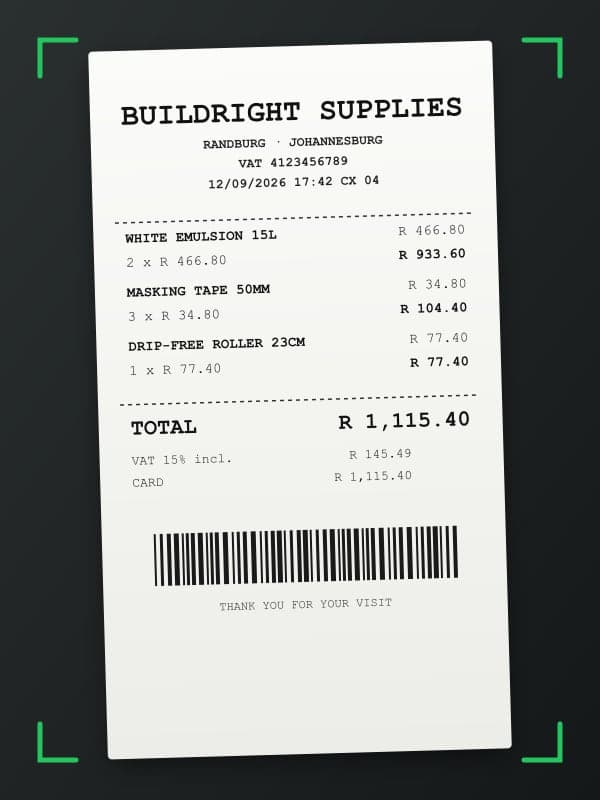
Point your camera. Prummo does the rest.
Review receipt
Supplier (optional)
Receipt date
Items (3)
+ Add itemDescription
Category
Qty
Unit price
Total
Description
Category
Qty
Unit price
Total
Description
Category
Qty
Unit price
Total
Photo and done
Shop, date, items and tax read from the receipt. Confirm and save.
Linked to the right job
Every receipt goes into the quote's cost. The real profit shows up straight away.
Month end without the shoebox
Monthly total, by shop and by category, with the tax split out for the accountant.
01
How it works
Take a photo of any receipt or slip. Prummo identifies each item and price automatically. No typing, no errors.
Monthly total
R 15,415.2017 receipts
By category
By shop
Linked to quotes
R 12,734.40
13 receipts
Not linked
R 2,680.80
4 receipts
Job profit
R 4,080 · 61%
The quote's profit strip, fed by the linked receipts.
02
Monthly expense tracking
All expenses organised by month and category. Know exactly how much you spend on materials, fuel, and tools.
Frequently asked questions
For anything else, message us on WhatsApp.
What types of receipts does the scanner support?
The scanner supports paper till slips photographed with your phone and digital invoices in image form. It works with receipts from hardware stores, fuel stations, suppliers, and building material merchants.
Is the receipt reading accurate?
Accuracy is high for receipts with good lighting and legible text. For badly faded or handwritten slips, you may need to confirm a few values before saving.
Does it work with both paper and digital receipts?
Yes. You can photograph a paper till slip with your phone's camera or upload an image of a digital receipt received by email. Both formats are processed the same way.
How does it categorise expenses automatically?
Prummo reads the contents of the receipt and suggests a category such as materials, fuel, tools, or meals. You can accept the suggestion or change it to whichever category fits.
Related content
Free to start
Start scanning receipts
Available on the Plus plan. Start with a 14-day free trial.